
Professional LED lighting
Skydance Controllers
11 products
Skydance controllers for 12V 24V 48V led strip & LED Neon Flex in single colour and RGB. With a range of options available, you will be able to find the perfect LED Controller for your installation.
Read more Show less
Skydance controllers for 12V 24V 48V led strip & LED Neon Flex in single colour and RGB. With a range of options available, you will be able to find the perfect LED Controller for your installation.

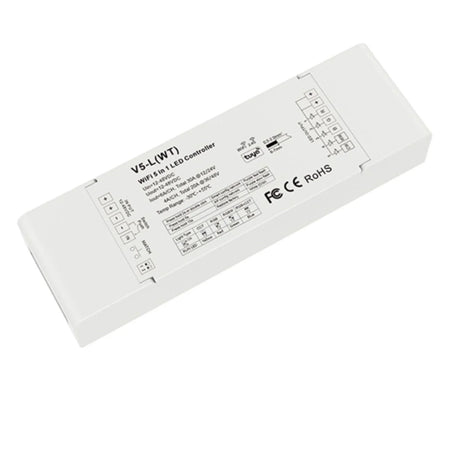
Skydance 12-48VDC 5CH*6A WiFi & RF 5 in 1 LED Controller V5-L(WT)
SKU: SKYD-V5-L(WT)£55.85Unit price /Unavailable
Skydance 12-48VDC 5CH*6A WiFi & RF 5 in 1 LED Controller V5-L(WT) with R8 Remote
SKU: SKYD-V5-L(WT)-R8£69.85Unit price /Unavailable

Skydance AC Triac Glass Rotary Panel Dimmer S1-K (WHITE)
SKU: SKYDANCE-S1-K£69.85Unit price /Unavailable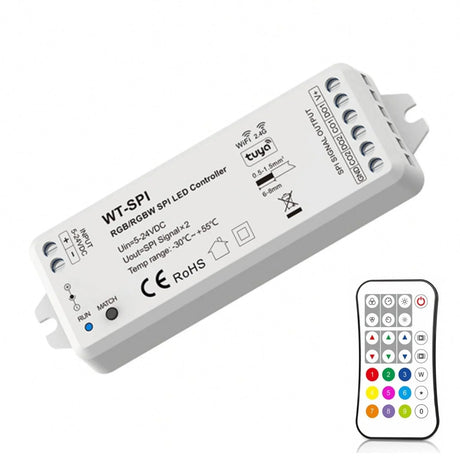 SKU: SKYD-WT-SPI-R9£69.75Unit price /Unavailable

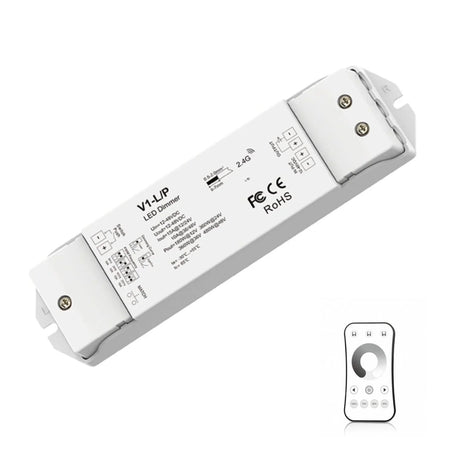
Skydance Single Colour 1CH*15A 12-48VDC CV Controller, Push-Dim V1-L/P with R6-1 Remote
SKU: SKYD-W1-L/P-R6-1£51.85Unit price /Unavailable
Skydance WT1 Wi-Fi LED Dimmer & CCT Controller, 12–36V
SKU: SKYDANCE-WT1£53.46Unit price /Unavailable
Skydance WT5 5-in-1 Wi-Fi LED Strip Controller, 12–24V
SKU: SKYDANCE-WT5£53.46Unit price /Unavailable


FAQs
What is the Skydance control ecosystem, and how do RF, Wi-Fi/Tuya, and DMX/0–10 V products work together on one project?
Skydance is a multi-protocol ecosystem where local 2.4 GHz RF remotes/panels provide low-latency control, Wi-Fi/Tuya devices enable cloud/app and voice integration, and DMX/0–10V units provide professional wired control — on large projects these layers are bridged so RF zones, app control and central systems can coexist and be synchronised.
How does the V5-L(WT) 5-in-1 controller handle single-colour, CCT, RGB, RGBW, and RGB+CCT modes from a single 12–48 V device?
The V5-L(WT) is a multi-mode constant-voltage device that exposes different terminal mappings and software modes for each output type, letting you select the active mode (single-colour, CCT, RGB, RGBW or RGB+CCT) so the same hardware drives different strip/channel configurations via mode switching.
How does the Skydance V5-L(WT) switch between single-colour, CCT, RGB, RGBW, and RGB+CCT modes?
Mode switching is done either by a short button sequence on the controller, by sending a pairing/command from an RF remote, or via the app/hub where you select the operating mode and the controller remaps its outputs accordingly.
What is the difference between Skydance V1, V3, and V5-L(WT) controllers in terms of channels, load, and supported strip types?
V1 models are typically single-channel (single-colour) for simple dimming, V3 are multi-channel (eg. RGB/RGBW) for colour mixing, and the V5-L(WT) is a flexible 5-in-1 unit supporting multiple strip types and channel combinations with higher feature sets and similar per-channel load ratings — always check the datasheet for exact amp/watt limits.
Which Skydance controllers are best for 12–48 V high-power installations such as long runs of LED neon flex or commercial strips?
Choose Skydance controllers rated for higher per-channel current and total wattage (or use multiple controllers in parallel), ensure proper cooling and power injection, and prefer models designed for pro/commercial use rather than compact consumer units.
What wiring guidelines apply to Skydance 12–48 V constant-voltage controllers to avoid overloading channels or causing voltage drop?
Use correct cable gauge for the current and run length, inject power at intervals for long runs, respect per-channel current limits, and place the controller and driver close to the load where practical to reduce voltage drop.
How many RF remotes can be paired with a single Skydance controller, and how does the auto-transmitting/synchronisation function work?
Most Skydance controllers support multiple remotes and group pairings so several remotes can control one controller or several controllers can be grouped; auto-transmit/sync typically broadcasts commands to all paired units so grouped controllers change state simultaneously (check model limits in the manual).
How do you match/ pair a Skydance RF remote to a controller (step-by-step)?
Put the controller into pairing mode (usually via a short press on the controller), press the designated button on the RF remote to register, then exit pairing; the exact button sequence is model-specific, so follow the supplied quick-start/pairing steps in the manual.
What are the advantages of combining RF remotes with Tuya Wi-Fi, Zigbee, or Bluetooth in Skydance LED controllers?
Combining RF with networked protocols gives the reliability and instant response of RF for local control plus the remote access, automation and voice integration of Wi-Fi/Tuya or Zigbee, delivering a resilient and feature-rich control system.
How do you connect Skydance RF & Tuya Wi-Fi controllers to the Tuya/Smart Life app and enable voice control via Alexa or Google Assistant?
Install the Skydance Wi-Fi hub or the Tuya-compatible controller, add the device in the Tuya/Smart Life app following the in-app onboarding steps, then enable the Tuya/Smart Life skill in Alexa/Google and link accounts to expose devices for voice control.
When should installers choose Skydance Zigbee & RF controllers (such as WZ5) instead of standard Wi-Fi models?
Choose Zigbee & RF when you need mesh reliability, low-latency local control, and enterprise-grade IoT integration with home hubs or when avoiding Wi-Fi congestion is important — Zigbee often excels in multi-device environments and battery-powered remotes.
How does the WT-SPI pixel controller simplify control of digital pixel RGB flex with Tuya app, RF remote, and music-sync modes?
The WT-SPI combines SPI pixel output with RF and Wi-Fi bridging so you can drive individually addressable pixels while controlling effects from an RF remote, the app, or via music-sync features without separate processors for each function.
Which Skydance SPI pixel controllers are compatible with which ICs (compatible IC list)?
Skydance SPI controllers commonly support mainstream ICs like WS2811/WS2812, SK6812, and similar SPI-type addressable LEDs, but exact IC support varies by model — always confirm the controller’s compatible IC list in the product spec sheet.
What PWM frequencies and dimming resolution do Skydance controllers offer, and why does this matter for flicker-free, camera-friendly installs?
Skydance units typically use high PWM frequencies (kHz range) and fine dimming resolution to minimise visible flicker and avoid camera banding; higher frequency and smoother curves produce more natural low-level fades and better results when filming.
How do you set PWM frequency and fade time on Skydance V5-L(WT) controllers, and why is this important?
On the V5-L(WT) these parameters are adjustable via the RF remote or app settings (or the hub), letting you choose a PWM frequency and fade curve that reduce flicker on cameras and improve perceived smoothness for filmed or broadcast environments.
How is an external push-switch connected to Skydance controllers to enable on/off and 0–100% push-dim control?
Connect a momentary (normally open) push switch to the controller’s designated push-input terminals and configure the controller to accept PUSH commands; a short press toggles on/off and long presses or double-press sequences perform dimming and scene recall.
How do you wire a Skydance V5 5-in-1 controller for RGBW strips?
Connect the 12–48V DC supply to V+ and V–, then attach the RGBW strip channels to the R, G, B and W outputs, verify polarity and secure connections, then pair the controller to the desired remote or app before testing at low brightness.
Which Skydance setups are recommended for multi-zone RGBW strip lighting in homes versus DMX-based control in bars, hotels, or stage projects?
For homes use Skydance Wi-Fi/RF multi-zone controllers with a hub for app/voice control; for commercial or stage use centralised DMX or 0–10V systems (or Skydance DMX-capable units) to provide reliable, synchronised control and integration with lighting desks.
How does a Skydance RF multi-zone remote (for example SK-R8) simplify control of 4 or more zones of RGB/RGBW strips?
A multi-zone remote provides dedicated zone selection buttons and presets so a single user interface can independently select and control multiple zones without needing to re-pair or switch remotes.
What are the key differences between Skydance 5-in-1 controllers and dedicated single-colour or CCT dimmers for simple residential installs?
5-in-1 controllers offer flexible multi-mode capability for mixed projects (useful when you may change strip types), while dedicated single-colour/CCT dimmers are simpler, cheaper, and slightly more efficient for straightforward single-function installations.
Which Skydance models include ZigBee functionality?
Skydance offers specific ZigBee-enabled controllers (eg. WZ series); check the product model number and spec sheet to confirm ZigBee support as it is model-dependent.
How do you set up auto-transmiting/synchronisation between multiple Skydance controllers?
Put each controller into the same RF group or pairing mode and use the remote or hub to assign them to the same zone/group so commands are transmitted to all devices simultaneously; refer to the model manual for precise group/pairing steps.
How can Skydance controllers be integrated with existing wall switches without losing smart features?
Use controllers that support momentary switch inputs (PUSH) or wire switches in parallel to control power/trigger inputs while retaining RF/app control; verify the controller’s support for external switches before wiring.
How do you connect Skydance RF & Tuya Wi-Fi controllers to the Tuya/Smart Life app and enable voice control?
Add the Skydance Wi-Fi gateway or Tuya-compatible controller to your Wi-Fi network, register it in the Tuya/Smart Life app per the manufacturer steps, then link the Tuya account to Alexa/Google to enable voice control.
What practical tips help when specifying Skydance for a mixed-protocol project?
Document zones, expected run lengths, and control priorities up front, pick Hub-enabled controllers where you need cloud/voice access, use RF for mission-critical local control, and plan power-injection and grouping to avoid voltage drop and ensure synchronisation.